How to run AI-powered Q&A during a deal, without leaking confidential data
This guide explains how to use AI agents for M&A Q&A, how to keep data room information confidential during AI-assisted due diligence, and how the Model Context Protocol (MCP) provides the controlled-access layer that makes secure, auditable AI-powered Q&A possible.
The Q&A phase of an M&A deal is where momentum is won or lost. Bidders fire off hundreds of questions (sometimes thousands) across diligence work streams, and the sell-side team is left racing to draft accurate, consistent responses before the next bid deadline. Every delayed answer is a friction point. Every vague response is a trust gap. And every leak of confidential information is a deal-breaking liability.
AI agents can change this equation. By reading directly from your virtual data room (VDR) and drafting answers grounded in the actual documents, AI can compress Q&A response times from days to hours. But doing this securely (without exposing sensitive deal data to the wrong models, the wrong people, or the wrong bidder groups) is the real challenge.
This guide explains how to use AI agents for M&A Q&A, how to keep data room information confidential during AI-assisted due diligence, and how the Model Context Protocol (MCP) provides the controlled-access layer that makes secure, auditable AI-powered Q&A possible.
Why does the Q&A phase kill deal momentum?
The Q&A phase can be the most operationally intense period of any M&A transaction. Here's why it's a bottleneck:
Volume is overwhelming. A mid-market deal can generate 500–1,500+ bidder questions across legal, financial, commercial, and operational work streams. Complex deals push past 2,000.
Every answer requires sourcing. A good answer isn't just a reply, it's a reply backed by the right document, clause, or data point in the data room. Finding that source manually takes time.
Consistency matters. When multiple team members answer questions independently, inconsistencies creep in, and bidders notice. Contradictory answers erode trust and can reopen diligence scope.
Deadlines are unforgiving. Bid rounds, exclusivity windows, and signing targets don't move because the Q&A backlog is deep. Late answers delay decisions, and delayed decisions kill deals.
The result: deal teams spend their highest-value hours doing low-leverage work: searching, reading, summarizing, and copy-pasting from data room documents.
AI agents flip this dynamic. Instead of humans hunting for the right document and drafting from scratch, an AI agent can read the data room, identify the relevant source material, and produce a grounded draft answer in seconds. The human reviewer's job shifts from writing to approving — a fundamentally faster and higher-quality workflow.
How can AI agents draft Q&A answers from a Virtual Data Room?
Here's what AI-assisted Q&A looks like in practice during an M&A deal:
The workflow
A bidder submits a question through the VDR's Q&A module (e.g.,"What are the key terms of the top 5 customer contracts by revenue?").
An AI agent receives the question and queries the data room for relevant documents: contracts, revenue schedules, customer summaries.
The agent reads the relevant documents, extracts the key terms, and drafts a structured answer.
A human reviewer on the sell-side team reviews the draft, edits if needed, and approves it for release to the bidder.
What AI agents can actually do during deal Q&A
Q&A Task | What the Agent Does | Time Saved |
Contract term extraction | Reads contracts, pulls key clauses (term, renewal, change-of-control) | Hours per question |
Financial data lookup | Queries financial statements, extracts specific figures | Minutes vs. hours |
Document summarization | Summarizes long technical or operational documents into concise answers | Significant for complex docs |
Cross-document comparison | Identifies inconsistencies or gaps across multiple documents | Enables faster quality review |
Answer drafting | Produces a structured, sourced draft ready for human review | Eliminates blank-page time |
Source citation | Links each claim in the answer to the specific document and page | Built-in audit trail |
The key insight
The AI agent doesn't replace the deal team, it replaces the search-and-draft step that consumes 70–80% of Q&A response time. The reviewer still owns the answer. But they start from a grounded, sourced draft instead of a blank screen.
What are the security risks of using AI in a Virtual Data Room?
Introducing an AI agent that reads data room content creates legitimate concerns. Data rooms exist precisely to control who sees what, and AI introduces a new access path that must be secured.
The core risks
Data exfiltration. If the AI agent sends data room content to an external model or API, that data has left your controlled environment. In a deal context, that's potentially catastrophic.
Overexposure. A bidder group's AI agent shouldn't see documents restricted to another bidder group. Permissions that exist in the VDR must carry through to the AI layer.
Model training exposure. If the AI provider trains on your inputs, your confidential deal data could surface in someone else's query response.
No deal-specific access controls. Generic AI tools don't understand deal structures: bidder groups, confidentiality tiers, document-level permissions, or clean-team boundaries.
Why traditional AI integration falls short
Most approaches to "AI + data room" involve one of two patterns, both of which are inadequate:
Export-and-upload: Someone downloads documents from the VDR and uploads them to an AI tool. This breaks permissions, creates copies outside the controlled environment, and produces no audit trail.
Custom API integration: The VDR provider or IT team builds a bespoke connection between the AI and the data room. This works for one system but doesn't scale, takes weeks to build, and needs to be redone for every new tool or data source.
Neither approach gives you the speed of AI and the security of the data room. You need a standard way to connect AI agents to data sources that preserves the access controls, auditability, and data minimization that deal environments demand.
How does MCP secure AI access to Virtual Data Rooms?
The Model Context Protocol (MCP) solves this problem by providing a standard, secure interface between AI agents and data sources — including virtual data rooms. MCP is an open protocol that defines how AI agents request data from external systems through a controlled, auditable server layer.
How MCP works in this context
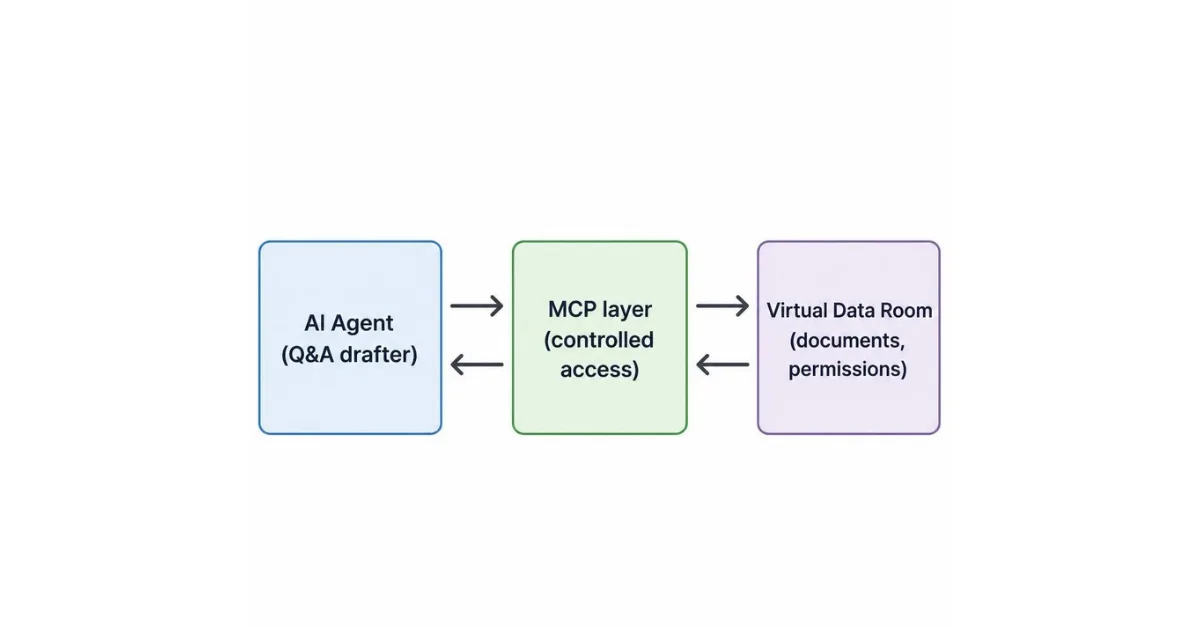
The AI agent never directly touches the data room. It sends requests through the MCP layer, which enforces permissions, logs access, and returns only the data the agent is authorized to see.
The four security properties MCP delivers for deal Q&A
1. Permissions carry through
MCP servers enforce the data room's existing permission model. If a document is restricted to Bidder Group A, the AI agent working on Bidder Group A's questions can access it, and an agent working on Bidder Group B's questions cannot. The VDR's access controls are the source of truth, and MCP respects them rather than bypassing them.
2. Full audit trails
Every request the AI agent makes through MCP is logged. This creates a complete, reviewable record of AI-assisted Q&A activity, essential for deal governance, legal privilege protection, and post-closing audits.
3. Data minimization
MCP allows you to expose only the specific tools and data the AI agent needs. Instead of giving the agent blanket access to the entire data room, you can scope it to:
Specific document categories (e.g., commercial contracts only)
Specific deal phases (e.g., Q&A phase tools only)
Specific actions (e.g., read and summarize, not download or export)
The agent gets exactly what it needs to draft an answer and nothing more.
4. No data leaves the controlled environment
With a self-hosted or VDR-integrated MCP server, the AI agent's data access stays within your controlled environment. The MCP server sits between the agent and the data room, and you control where the LLM inference happens.
MCP vs. Alternatives: A Quick Comparison
Requirement | Export & Upload | Custom API | MCP |
Preserves VDR permissions | ❌ Broken on export | ⚠️ Custom-built per deal | ✅ Enforced at the server |
Audit trail | ❌ None | ⚠️ Manual logging | ✅ Built-in |
Data minimization | ❌ Full docs exported | ⚠️ Depends on build | ✅ Tool-level scoping |
Time to deploy | Hours (manual) | Weeks (engineering) | Hours (standard) |
Works across VDRs/tools | ❌ | ❌ One-off | ✅ Standard protocol |
Scalable across deals | ❌ | ❌ | ✅ Reusable |
How do you set up AI-assisted Q&A for your next deal?
Here's a step-by-step playbook for deploying AI-powered Q&A on your next transaction:
Step 1: Map your Q&A workflow
Before any technology, document how your team currently handles Q&A:
Who receives questions and triages them?
Who drafts answers for each work stream (legal, financial, commercial, operational)?
What's the approval chain before answers go to bidders?
Where are the bottlenecks: is it finding the right document, drafting the answer, or getting approval?
This map tells you where AI agents add the most value and where human checkpoints must remain.
Step 2: Deploy an MCP server for your data room
Set up an MCP server that connects to your VDR's document repository and permission model.
This server:
Authenticates against the VDR's existing user/role system
Exposes tools for document search, retrieval, and summarization
Enforces document-level and bidder-group permissions
Logs every access request
Step 3: Configure the AI agent's access scope
Using MCP's tool-scoping capabilities, define exactly what the AI agent can do:
Which document categories it can access (e.g., commercial contracts, financial statements, HR records)
Which actions it can perform (e.g., search, read, summarize — but not export or download)
Which deal phases it's active in (e.g., Q&A phase only, not the full lifecycle)
This is your data minimization layer. The tighter the scope, the lower the risk.
Step 4: Build the Q&A drafting workflow
Configure the AI agent's Q&A workflow:
Intake: The agent receives a question from the VDR's Q&A module (via MCP)
Retrieval: The agent searches the data room through MCP for relevant documents, scoped to the correct bidder-group permissions.
Drafting: The agent reads the relevant documents and drafts a structured answer with source citations.
Review & approval: The human reviewer edits, approves, or rejects the draft.
Posting: The approved answer is posted to the VDR Q&A module with supporting document references.
Step 5: Establish human checkpoints
AI-assisted doesn't mean AI-autonomous. Define clear checkpoints:
Every draft is reviewed by a human before it reaches a bidder. No exceptions.
Sensitive categories require senior review. Questions about management agreements, IP ownership, or litigation should route to partners or senior associates, not junior reviewers.
Contradiction detection. If the AI agent's draft contradicts a previously answered question, flag it for manual review before posting.
Step 6: Monitor, audit, and iterate
Once the workflow is live:
Review the MCP audit logs weekly: confirm the agent is accessing only authorized documents.
Track response time metrics: measure the reduction in average Q&A response time compared to your pre-AI baseline.
Track answer quality: monitor how often human reviewers approve AI drafts as-is vs. with substantial edits. This tells you where the agent is performing well and where it needs refinement.
Conduct a post-deal review: review the full audit trail, gather feedback from the deal team, and refine the workflow for the next transaction.
Step 7: Scale Across Deals
The MCP server and Q&A workflow you build for one deal are reusable. Because MCP is a standard protocol, the same server can connect to different VDRs, different AI agents, and different deal teams. Your second deal setup takes hours, not weeks — and each deal's audit trail is independent and complete.
Frequently Asked Questions: AI-powered Q&A in Virtual Data Rooms
Can AI agents read documents inside a virtual data room?
Yes. Using the Model Context Protocol (MCP), AI agents can securely search, read, and summarize documents inside a virtual data room without exporting them. The MCP server acts as a controlled-access layer between the agent and the VDR, enforcing the data room's existing permissions and logging every access request.
Is it safe to use AI for M&A Q&A?
AI-assisted Q&A is safe when the AI agent accesses the data room through a controlled layer like MCP. The key requirements are: (1) the agent never directly accesses the data room — it goes through MCP, which enforces permissions; (2) every access is logged for audit purposes; (3) the agent is scoped to only the document categories and actions it needs; and (4) every draft answer is reviewed by a human before it reaches a bidder.
How does MCP protect confidential deal data?
MCP protects confidential data in four ways: it enforces the VDR's existing permission model (so bidder-group restrictions carry through to the AI layer), it logs every document access for a full audit trail, it enables data minimization by scoping the agent's access to specific tools and document categories, and it keeps data within your controlled environment — the MCP server sits between the agent and the data room, and you control where LLM inference happens.
How much time does AI save during the deal Q&A phase?
AI agents can reduce Q&A response time by 70–80% by automating the search-and-draft step. Instead of a deal team member spending hours finding the right document and writing an answer from scratch, the AI agent drafts a grounded, sourced answer in seconds. The human reviewer then approves or edits the draft, a process that takes minutes rather than hours per question.
What's the difference between MCP and a custom API integration for a data room?
A custom API integration is a one-off connection built specifically for one VDR and one AI tool. It takes weeks to build, needs to be rebuilt for every new tool, and doesn't scale across deals. MCP is a standard protocol. You build one MCP server for your data room, and any MCP-compatible AI agent can connect to it. This reduces deployment time from weeks to hours and makes the integration reusable across deals, VDRs, and AI tools.
Does using AI in a data room create compliance or legal privilege risks?
It can if done improperly — for example, if documents are exported to an external AI tool with no audit trail. MCP mitigates this risk by keeping all access within the controlled environment and logging every request. However, deal teams should still consult counsel on privilege considerations specific to their jurisdiction and deal structure, and ensure that human review checkpoints are maintained for all AI-drafted answers.
How long does it take to set up MCP for a virtual data room?
If your VDR provider offers a native MCP integration, setup can be completed in hours. If you need to build an MCP server that wraps your VDR's existing API, expect a few days — not weeks — because MCP provides the standard interface structure. Once built, the MCP server is reusable across future deals.
The Bottom Line
The Q&A phase doesn't have to be the bottleneck that kills deal momentum. AI agents can dramatically compress response times by drafting grounded, sourced answers from your data room, but only if the security architecture is right.
MCP provides the controlled-access layer that makes this possible: permissions carry through, every access is audited, data is minimized to what the agent needs, and nothing leaves your controlled environment. The result is a Q&A workflow that's faster, more consistent, and more secure than the manual process most deal teams rely on today.
If you're preparing for a deal and want to see how MCP can connect AI agents to your virtual data room, the time to set it up is before the Q&A flood starts — not during it.